🏁 Overview
Feedback System Overview
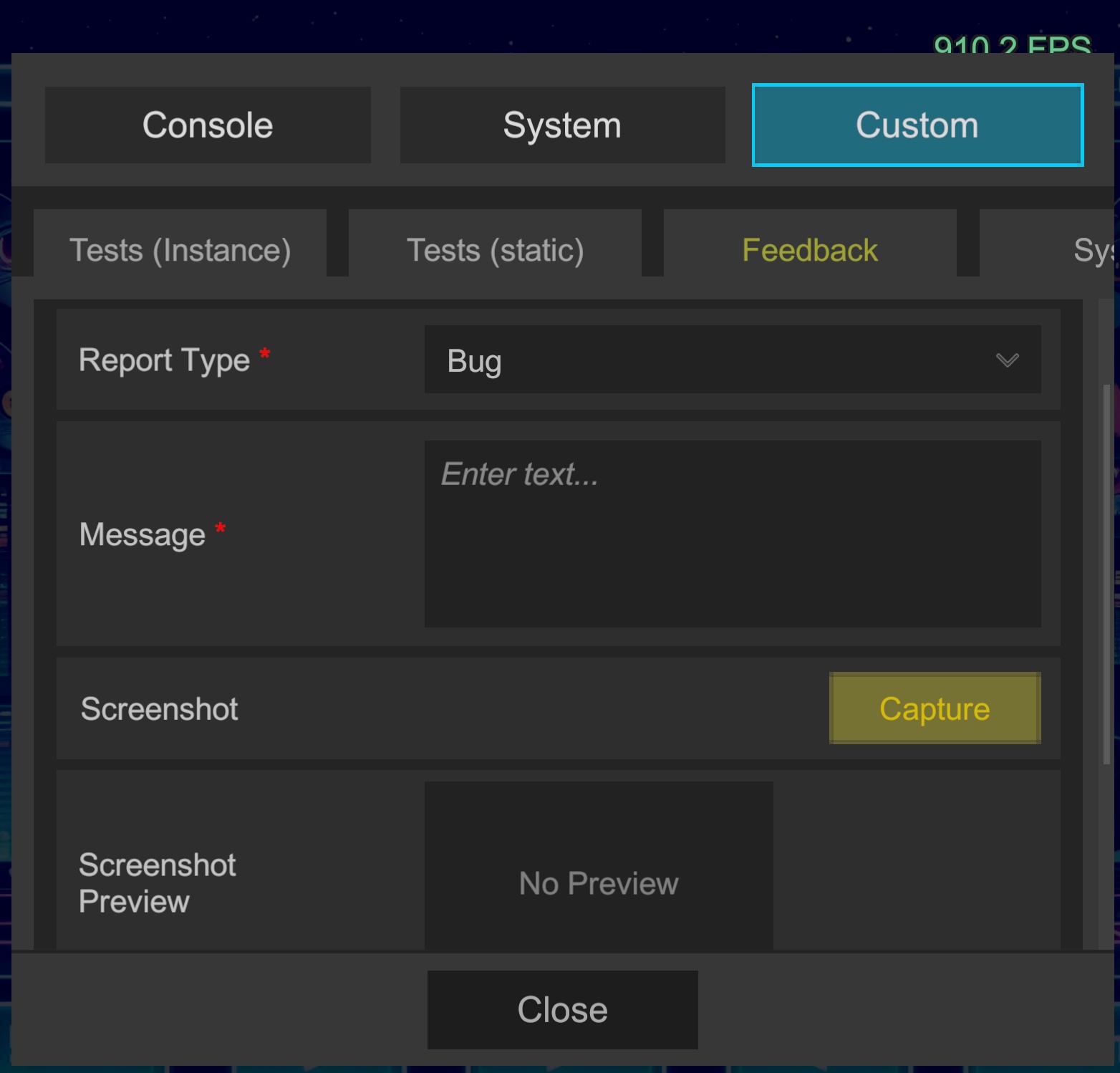
Provides a dedicated form to receive feedback directly from testers and development members.
A Feedback tab is automatically added within the Custom tab, allowing reports to be submitted from there.
🎯 Main Features
- Automatic Context Information Collection: In addition to user-entered messages, automatically appends OS information, memory status, FPS, stack traces, and more.
- Screenshot Attachment: Click the Capture button to include in submission data.
- Advanced Security Measures:
Optimal protection is applied based on integration mode.
- Server Integration: Submission payload is signed with HMAC to prevent tampering in transit and on server side.
- Direct Integration (IL2CPP builds only):
Handles confidential information (tokens, etc.) via C++ Native Plugin (Native Bridge) dynamically generated by
Secret Generator. Significantly delays token extraction through memory dumps or static analysis, minimizing security risks.
🆔 About Reporter ID
Feedback is assigned a reporter_id to identify the sender.
reporter_id is a unique ID generated per device.
If the app is uninstalled (reinstalled), this ID is regenerated with a new value.
This allows distinguishing "which device (tester) submitted the report" even in development-stage apps without login functionality.
📊 Automatically Collected Data List
In addition to user-entered "message" and "report type (Bug/Feedback)", the following technical data is automatically sent.
📱 Application & Environment Information
| Description | Source / Notes |
|---|---|
| Game Title | Application.productName |
| Bundle ID / Package Name | Application.identifier |
| App Version | Application.version |
| Unity Version | Application.unityVersion |
| Installer Store Name | Application.installerName (Editor: "N/A") |
| Scripting Backend | IL2CPP or Mono |
💻 Device & OS Information
| Description | Source / Notes |
|---|---|
| Platform | Application.platform (Android, IPhonePlayer, etc.) |
| OS Version Details | SystemInfo.operatingSystem |
| Device Model Name | SystemInfo.deviceModel |
| System Language | Application.systemLanguage |
🖥️ Display & GPU Information
| Description | Source / Notes |
|---|---|
| Screen Resolution (Width) | Screen.width |
| Screen Resolution (Height) | Screen.height |
| Screen Density (DPI) | Screen.dpi |
| Refresh Rate | Screen.currentResolution (F3 format) |
| GPU Name | SystemInfo.graphicsDeviceName |
| GPU Type | SystemInfo.graphicsDeviceType (Metal, Vulkan, etc.) |
| VRAM Capacity (MB) | SystemInfo.graphicsMemorySize |
🚀 Performance & Runtime State
| Description | Source / Notes |
|---|---|
| System Memory (MB) | SystemInfo.systemMemorySize |
| App Uptime | Time.realtimeSinceStartup |
| Estimated FPS at Submission | 1.0f / Time.smoothDeltaTime |
| Current Active Scene | SceneManager.GetActiveScene().name |
📎 Attachments
In addition to text data, the following files are included as multipart form data.
- screenshot (
.jpg)- Screenshot captured via Capture button (JPEG compression)
- Allows immediate verification of UI state and bug appearance
- logs (
.txt)- Recent log dump (Warning / Error) with corresponding stack traces
- Used for call stack analysis during errors
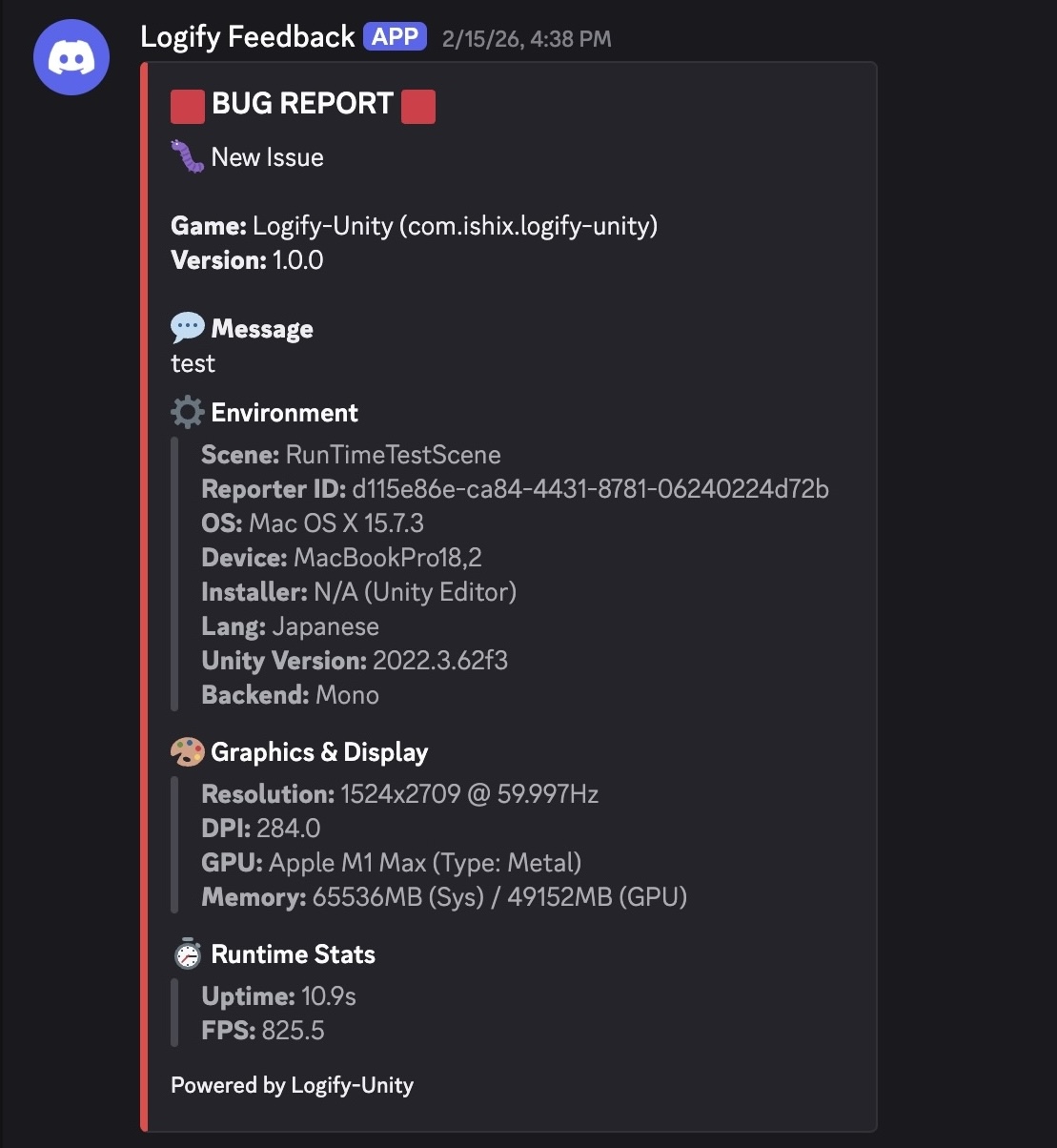
📋 Discord Reception Example
🚀 Next Steps
Configure integration settings to receive feedback.
🔌 Quick Integration (No Server Required)
Ideal for early development or small team testing.
🛡️ Robust Operations (Using Server)
For installations by unspecified users or when requiring higher security/flexibility. Recommended when email integration is desired.